Sites run a rain about every 30 minutes with a two minute window to join. Rainy joins all of them for you across Diceblox, Goldpump, Upgrader and ChickenGG, and posts every rain and balance straight to your own Discord.
You use your own accounts. Rainy logs in as you on sites you already have. It doesn't hand out accounts and it won't make them for you.
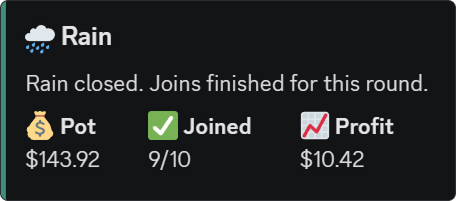
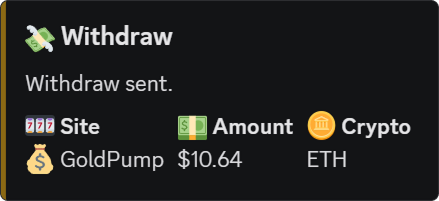
A simulated Discord channel where the Rainy bot posts each rain it joins across four casino sites, with the running balance.
Every site announces rains differently, so each one has its own listener rather than a shared scraper pointed at four URLs.
Cloudflare Captcha with hard CORS policy blocks, scheduled rains, and automatic promo code claiming.
Cloudflare Captcha with scheduled rain drops.
Random rains with business hCaptcha.
Cloudflare Captcha with rains.
The join goes out around 30 seconds into a two minute window, on all four sites, around the clock. Full coverage of every rain a site runs, whether you're at your desk or asleep.
Encrypted by DPAPI and kept on your own machine, nowhere else.
Invite the bot to a Discord of your own and it posts every join and balance there. Yours to read from anywhere, on your phone included.
When a connection drops, like the gap above, it comes straight back and resumes the schedule by itself. You get an unbroken overnight run without touching anything.
About ten minutes once, then it runs on its own. Most of that is making accounts if you don't have them yet.
This part is on you. Rainy works through your own accounts on Diceblox, Goldpump, Upgrader and ChickenGG. It doesn't provide accounts, share them, or register them for you. Any site you skip simply won't be farmed. Note that most sites won't let a brand-new account claim rains until it has some chat activity or a first deposit behind it, so check each one's rules before assuming nothing is working.
Reporting and account setup both live in Discord. Spin up a server of your own, invite the bot, and it becomes the place where you add logins and where every rain and balance gets posted. It's your server, so nobody else sees it and you can read it from your phone.
Use the Add account button in Discord to enter each site's username and password. The bot logs in for you and keeps the session cookies fresh on its own, so you don't have to paste cookies every time they expire.
Each site runs its own listener, so one going down doesn't stop the rest. Close the window to the tray and watch the numbers show up in Discord.
Yes, and this is the part people miss. Rainy is a client that acts on your behalf using accounts you already have. It does not come with accounts, it can't create them, and nobody is sharing one with you. Register on whichever of the four sites you care about, then add your username and password through the Discord bot. Sites you don't sign up for are just skipped.
Because you can read Discord from anywhere. The desktop app runs the listeners, but the joins, amounts and balances get posted by a bot into a server you create and own. That means you can leave the PC running at home and still see what landed overnight from your phone. Nothing is posted anywhere else, and no server of ours is involved.
Yes. The app holds its own sessions, so nothing needs to stay open in a tab.
Yes. Nothing of yours is sent anywhere at all. Tokens and logins stay on your machine, encrypted in the operating system's credential store. We have no server that receives them, and the app never phones home with your credentials.
Automating claims is against the terms of service on most casinos, so yes, it's a risk you're taking on. The app uses jittered timing and per-site rate limits to stay within normal usage patterns, but nobody can promise you anything here. Don't run it on an account you'd be upset to lose.
Yes. Each site needs its own listener, so they land one at a time, but there will definitely be support for more websites in the future. Requests go in the Discord.
Nothing.
Bring your own accounts on the sites you want farmed. Everything else is handled in the app.
Chrome may warn that the file “isn’t commonly downloaded.” That’s normal for a new Windows app — open the download shelf and choose Keep / Keep anyway.